

_edited.png)


Podcast Production
- Andy Phillips
- Aug 4
- 13 min read

Updated: Sep 28

🎙️ 1/. What is a Podcast?
A podcast is essentially an episodic series of digital audio or video files, distributed over the internet, that users can download or stream to listen to on demand. Think of it like a radio show you can listen to anytime, anywhere, on your own schedule. Podcasts are typically distributed through platforms like Apple Podcasts, Spotify, or YouTube.
🎙️1/A. Modern form of Social Media:
Podcasts are a modern form of digital media consisting of a series of spoken-word audio episodes, each focused on a specific topic or theme.
Podcasts may remind you of radio, but they're actually quite different. Both are audio-only, yet with podcasts, you can subscribe and listen on your own schedule. You can enjoy your favourite shows whenever and however you like. This flexibility is what makes podcasting a popular choice for media consumption today.
🎙️ 1/B. Accessing a Podcast:
To access a podcast, you can follow these steps:
Download a Podcast App: Install a free podcast app on your smartphone, such as Apple Podcasts or Spotify.
Search for Podcasts: Open the app and use the search function to find your favorite podcast or explore topics of interest.
Listen on Various Platforms: You can also access podcasts on platforms like YouTube Music or directly on Spotify.
Use a Computer: If you prefer listening on a computer, you can use iTunes to find and subscribe to podcasts.
Smart Speakers: You can ask your smart speaker to play a specific podcast by saying, "Play the podcast [name]".
These methods will help you easily access and enjoy podcasts on various devices.
🎙️1/C. Benefits of Podcast Production:
Episodic format: Podcasts are often released in a series of episodes, similar to a TV show, with each episode covering a specific topic or theme.
Variety of topics: Podcasts cover a wide range of subjects, from news and current events to comedy, storytelling, interviews, and more.
User-friendly distribution: Podcasts are easily accessible through various apps and platforms, allowing listeners to subscribe and receive new episodes automatically.
Creators and audiences: Podcasts are created by a variety of individuals and organizations, from large media companies to individual enthusiasts, and are consumed by diverse audiences.
On-demand availability: Unlike traditional radio, podcasts are pre-recorded and available for download or streaming whenever you choose, making them convenient for on-the-go listening.
🎙️ 2/. How to Start a podcast?
Watch this video,
🎙️ 2/A How to Script your Questions?
The "5 Ws" are five interrogative words—Who, What, When, Where, and Why—used as a framework for gathering comprehensive information and ensuring a complete understanding of a subject or event. These questions are foundational in fields like journalism, research, and investigations to form a complete story by covering key details.
🎙️2/A. Here are the 5 Ws plus and their purpose?
Who: Identifies the people or groups involved.
What: Describes the event, subject, or core of the story.
When: Specifies the time or date of the event.
Where: Pinpoints the location where the event occurred.
Why: Explains the reason or cause behind the event.
"How": The addition of "How" questions the manner or process by which something happened.
🎙️2/B.They are used for?
Journalism: To construct a complete and factual news report.
Research: To ensure all essential details are covered and to trace information back to its source.
Problem-solving: To understand the root causes and processes involved in a problem.
Writing: To teach children how to form complete narratives and gather information.

🎙️2/C. What is a Question or Issue tree?
A question tree, more commonly known as a issue tree or decision tree, is a visual, hierarchical framework for breaking down a complex problem or decision into smaller, more manageable sub-questions or choices. Issue trees systematically dissect a problem to identify root causes or key issues, often used in business and management consulting to find solutions.
Decision trees map out possible outcomes of a series of choices, helping to weigh risks, benefits, and probabilities to determine the best course of action.
🎙️2/D. Issue Trees (for problem-solving)
Purpose: To break down a main problem into smaller, actionable components.
Structure: A pyramid-like structure that shows how a problem can be broken down into sub-issues and then sub-sub-issues, covering all parts of the problem.
Application: Widely used in consulting and management to analyze problems, identify the root causes of an issue, and develop effective solutions.
Key Principle: Built on the MECE principle (Mutually Exclusive, Collectively Exhaustive), meaning the branches should not overlap and together should cover the entire issue.
🎙️3/B. Decision Trees (for decision-making)
Purpose: To visualize the possible outcomes of a series of decisions and to predict the best course of action.
Structure: A tree-like structure with a root node (the starting question), branches (representing choices or probabilities), internal nodes (where decisions are made), and leaf nodes (the final outcomes or predictions).
Application: Used for complex decision-making, data analysis, and as a supervised learning algorithm in machine learning to predict outcomes.
Function: Allows users to weigh different choices by considering their potential costs, probabilities, and benefits, leading to more informed decisions.
🎙️3/. Three Stages of Podcast Production:
Pre-Production
Production
Post Production
🎙️3/A. Pre-Production:
Planning & Preparation:
Podcast Idea: Defining your niche, target audience, and overall concept.
Branding: Creating a unique name, logo, and visual identity for your podcast.
Format & Structure: Determining the format (interview, storytelling, etc.) and structure (episode length, segments).
Equipment & Software: Choosing the right microphones, headphones, recording software, and editing tools.
🎙️3/B. Production:
Recording: Learning techniques for clear and engaging audio recording.
Editing: Removing background noise, improving audio quality, and adding music and sound effects.
Content Creation: Developing compelling content for each episode.
Guest Management: If applicable, learning how to book, prepare, and interview guests.
🎙️ 3/C. Post Production:
Distribution & marketing;
Podcast Hosting: Choosing a platform to store and distribute your podcast files.
Submission: Submitting your podcast to popular directories like Apple Podcasts, Spotify, and Google Podcasts.
Marketing & Promotion: Utilizing social media, email marketing, and other strategies to reach your target audience.
Engagement: Interacting with your listeners and building a community around your podcast.
Monetization: Exploring options for earning revenue from your podcast, such as advertising or sponsorships.
🎙️3/D. Ongoing Improvement:
Analytics: Tracking your podcast's performance and identifying areas for improvement.
Feedback: Gathering feedback from listeners to refine your content and approach.
Adaptation: Staying updated on industry trends and adapting your podcast accordingly.
🎙️4/. Equipment
What Equipment Do I Need to Start a Podcast?
If you have access to a laptop and a WiFi connection, you have almost everything you need to start your podcast.
🎙️4/A. Essential Podcast Gear for Beginners:
Laptop:
Microphone:
Headphones:
Keep in mind you could opt for podcast equipment bundles or even starter kits if you want to get started faster.
🎙️4/B. Additional Equipment for Professionals:
You may also need additional podcast equipment and accessories as you grow, depending on the type of podcast you want. This includes;
Mixers:
Interfaces:
Cameras:
🎙️4/C. Video accessories (lighting, studio setup):
Regardless, let’s take a look at each of these tools so you can mix and match the right options for your show.
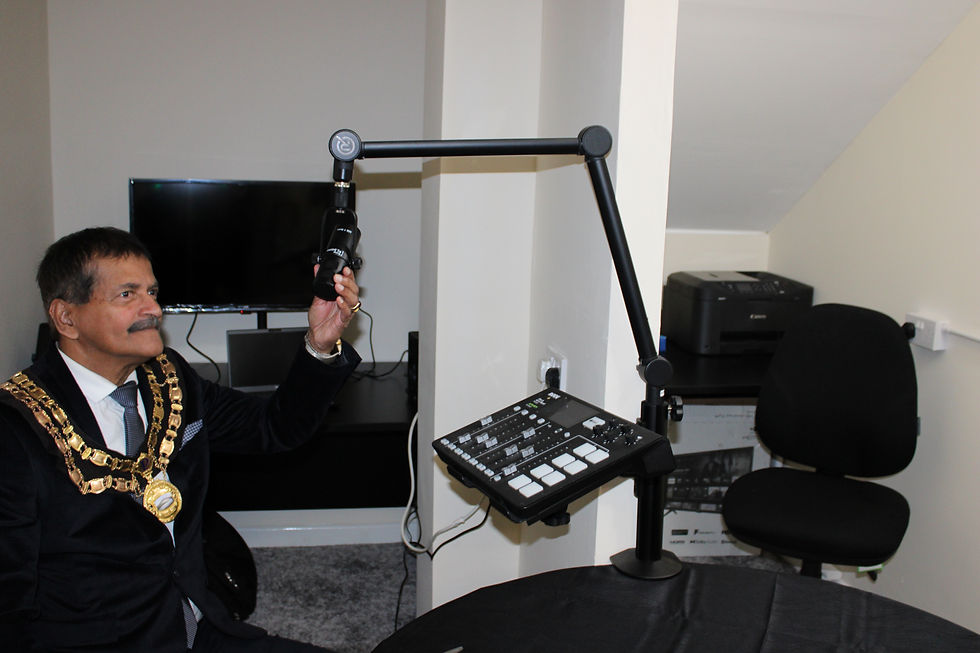
🎙️4/D. What Is a Podcast Equipment Bundle?
Use the RØDE Podcast Equipment Bundle if you want a high-quality setup.
If you don’t want to wait to get up and running, you could always purchase a podcast equipment bundle.
Podcast bundles simplify equipment shopping for solo creators and are frequently highlighted in beginner-focused outlets like Podnews reviews.
Bundles are fast and simple, removing the guesswork of shopping. That said, its convenience doesn’t come cheap; it might be more expensive to bundle equipment or purchase multiple tools you already own.
🎙️4/E. What’s Included in a Podcast Equipment Bundle?
With the help of a podcast equipment bundle, you can source all the equipment you need for your show. Each package looks different depending on the company in question, but you can generally expect to see:
A mixer or interface, A microphone, Headphones, Boom stands & Cables.
🎙️4/F. Should I Use a Podcast Mixer or an Audio Interface?
Let’s compare different mixers and interfaces.
Podcast mixers and audio interfaces can help you capture audio from multiple sources.
You can use podcast mixers to consolidate multiple audio sources into a single digital
signal, or
audio interfaces to turn analog sound into digital data by connecting your microphone to a computer.
4/G. Which one makes the most sense for you?
You may want to opt for a podcast mixer if:
You plan to have two or more guests present in person
You want to play live sound effects or background music
You want to perform basic edits before opening your editing software
🎙️4/H. Alternatively, you may be comfortable using an audio interface if:
You need more portability for your podcast setup
You already own separate DAW software
You’re comfortable with limited built-in processing.
🎙️4/I. What Is a Podcast Mixer?
The podcast mixer is a powerful tool that can help you capture, mix, and perform basic audio edits. There are dozens of different models on the market, and each one comes with its own set of benefits.
🎙️ 5/. How to Start a vlog (video podcast production):
You’ll have six options to choose from:
webcams, DSLRs, camcorders, action cameras, smartphones and 360 Immersive camera.
Webcams: If you own a laptop, tablet, or desktop computer, you probably have access to a built-in webcam. The good news with webcams: they’re fairly cost-effective. Even third-party webcams can capture high-quality footage. The bad news with webcams: there’s a limit to their quality. You’ll be hard-pressed to move beyond 1080p without purchasing a more capable camera.
DSLRs: For most podcast videographers, the digital single-lens reflex camera (or DSLR) is a decent option. The biggest benefit is their huge versatility. They’re also easy to transport for field recordings, even if most popular models last 90 minutes or less.
Camcorders: Many podcasters use camcorders to tap into unique features that are harder to find on DSLRs. This could be remote-controlled activation, extended battery life, or the option to connect directly to your microphone(s). However, these lightweight cameras only capture video files, which means unlike DSLRs, you can’t use them to take pictures.
Action Cameras: Action cameras include brands like GroPro and AKASO, which were uniquely designed to be worn while ‘in action.’ The best action cameras offer 5k recording plus a 64 GB recording capacity. However, it may be wise to purchase multiple SD cards, as you can only capture around two hours of footage on most video settings.
Smartphones: There’s a good chance you already own a smartphone, but budget models or older phones may not be up to the task. You could also potentially purchase an upgradable vlogging kit, which you could use to live stream content from the Riverside.fm mobile app.
🎙️ 5/B. 360° Immersive Video?
360 immersive Podcasts: To introduce the Insta 360 camera into your podcast production, consider the following steps:
1. Utilize 360° Video: The Insta 360 camera allows you to capture immersive 360-degree video, which can be a unique storytelling element for your podcast.
2. Overcapture Techniques: Use overcapture to include multiple perspectives in your interviews, such as capturing both the interviewee and the interviewer from different angles.
3. Editing with Insta360 Studio: Familiarize yourself with the Insta360 Studio app, which offers advanced editing tools for stitching and synchronizing your 360° footage, enhancing the overall quality of your podcast.
4. Creative Formats: Experiment with different video formats (e.g., 9:16, 1:1, 16:9) to find the best fit for your podcast content.
By integrating these features, you can create engaging and visually appealing podcast episodes that stand out.
🎙️6/. What Other Equipment will I need?
What Lighting Options Improve a Video Podcast?
There are typically three types of light used in professional video:
Key light
Back light
Fill light

🎙️6/A. Other Equipment?
However, you don’t need to purchase tungsten lights to keep your podcast professional. You could opt for fluorescents on adjustable necks, LED strip lights, clip-on ring lights, and other
These include:
Greenscreens: Sometimes referred to as chroma key sheets, green screens are essentially solid-color ‘curtains.’ These can be hung in the background of any video production to transpose another background behind the person (or people) in the frame. You can create a DIY greenscreen at home, depending on your experience and access to fabric backdrops.
Sound improvement: If you’re dealing with audio issues like room reflections or reverb, you’ll need a set of audio enhancers that don’t downgrade the visual quality of your show. This might include ceiling clouds or acoustic panels, as well as base traps and
Software: But purchasing podcast equipment is just one piece of the puzzle; you also have to think about podcast software. This includes tools for recording, editing, and hosting your show, not to mention video editing software (unless you’re handing that off to a dedicated team).
🎙️6/B. What Software will I need?
Creating a podcast involves several stages—recording, editing, and publishing—and there’s software tailored to each. Here’s a breakdown of the most popular and effective tools across the board:
🎙️6/C. Recording Software:
Used to capture your voice or conversations.
Audacity (Free): Great for beginners; simple interface and solid recording quality.
GarageBand (Free on Mac): User-friendly with built-in music loops and effects.
Riverside.fm: High-quality remote recording with separate tracks for each speaker.
Zencastr / SquadCast / Cleanfeed: Ideal for remote interviews with guests.
🎙️6/D. Editing Software:
Used to clean up audio, add music, and polish your episodes.
Adobe Audition: Professional-grade editing with advanced features.
Descript: Edit audio by editing text—perfect for fast workflows and transcription.
Reaper: Affordable and powerful for multitrack editing.
Alitu: All-in-one tool that automates editing and adds music intros/outros.
🎙️6/E. Publishing & Hosting Platforms:
Used to distribute your podcast to Spotify, Apple Podcasts, etc.
Buzzsprout:
Podbean:
Anchor (now Spotify for Podcasters):
Transistor:
🎙️ 7/. Creating a Slide Show podcast:
A slideshow podcast is a hybrid media format that combines audio narration (like a traditional podcast) with visual slides, often in the form of a video. Think of it as a podcast you can watch as well as listen to. Here's how it works:
Audio narration or dialogue: Just like a regular podcast, it features hosts or speakers discussing a topic.
Visual slides: These can be static images, PowerPoint-style slides, infographics, or even short video clips that appear in sync with the audio.
Distribution: Usually shared on platforms like YouTube, Vimeo, or embedded on websites—rather than audio-only platforms like Spotify or Apple Podcasts.
🎙️7/A. Common Uses:
Educational content: Teachers or trainers use slideshow podcasts to explain concepts with visual aids.
Business presentations: Companies turn slide decks into narrated videos for remote teams or clients.
Storytelling: Creators use visuals to enhance personal stories, travel logs, or historical narratives.
🎙️7/B. How It's Made:
Create slides in PowerPoint or similar software.
Record audio using tools like Audacity or GarageBand.
Sync the audio with the slides using video editing software (e.g., iMovie, Adobe Premiere).
Export as a video file and upload to a platform.
It’s a great format when you want to engage both the eyes and ears—especially for topics that benefit from visual explanation. Would you like help creating one or brainstorming a topic for it?
🎙️ 8/. Simple Questions?
Are you ready yet to start a podcast?
🎙️ 12/. Frequently asked Questions:
1/. What podcast equipment do I need to start a podcast?
You need three essentials: a laptop, microphone, and camera (if recording video). Headphones are strongly recommended, but beginners can start with this setup, then add a mixer, interface, or recording accessories as they grow.
2/. How much does it cost to start podcasting?
Beginner podcast setups cost under $300, while professional setups can range from $1,000 to $2,500 or more depending on microphones, mixers, and cameras.
3/. Should I buy a podcast equipment bundle or individual pieces?
Bundles are faster and simpler, but often cost more and may include items you don’t need. Buying individual items is cheaper and more flexible, though it requires research to ensure compatibility.
4/. What’s the difference between a mixer and an audio interface?
A mixer combines multiple audio sources into one signal with live control. An audio interface converts analog sound into digital signals for your computer. Mixers are best for in-person guests and effects, while interfaces are portable and cost-effective.
5/. What podcast equipment do I need for video podcasts?
You’ll need a camera (webcam, DSLR, camcorder, or smartphone), lighting, and recording software. Beginners can use a webcam or smartphone with a tripod, while professionals may upgrade to DSLRs or camcorders.
6/. What type of microphone should I get for a podcast?
Dynamic microphones are ideal because they reduce background noise. USB mics are easiest for beginners, while XLR mics offer better quality when paired with an audio interface. Popular options include the RØDE PodMic, Audio-Technica AT2040, and Samson Q2U.
7/. What is the cheapest way to start podcasting?
The most affordable setup is a USB microphone with built-in headphones connected to your laptop. This can cost under $100 and is enough to record basic audio.
8/. Do I need headphones for podcasting?
Headphones aren’t required, but they help monitor your audio, reduce echo, and improve sound quality during recording and editing.
9/. What laptops work best for podcasting?
MacBook Pro, Dell XPS, and Microsoft Surface models are top picks due to battery life and audio processing performance. Budget users can choose Lenovo IdeaPad or Acer Aspire laptops for under £500.
🎙️ 3/. A to Z of Podcast production?
A to Z of podcast production encompasses planning, recording, editing, and promoting your show. It involves choosing a format, securing equipment, scripting, recording, editing, hosting, and marketing your podcast.
This video provides a comprehensive guide to podcast production, from planning to publishing:
A-M:
Audience: Define your target listeners to tailor your content.
Brief: Create an episode outline or script to guide your recording.
Concept: Develop a unique and engaging idea for your podcast.
Distribution: Choose podcast directories (e.g., Apple Podcasts, Spotify) to submit your show.
Equipment: Invest in a decent microphone, headphones, and recording software.
Format: Decide on the structure of your podcast (e.g., interview, narrative, solo).
Hosting: Select a podcast hosting platform to store and distribute your audio files.
Intro/Outro: Create engaging opening and closing segments.
Jingles/Music: Incorporate elements to enhance the listening experience.
Keywords: Use relevant keywords in your podcast title, description, and episode titles to improve searchability.
Length: Determine an ideal episode length based on your content and audience.
Monetization: Explore options like advertising, sponsorships, or listener support.
Name: Choose a memorable and relevant name for your podcast.
N-Z:
Outlining: Create a detailed plan for each episode.
Promotion: Utilize social media, email marketing, and other strategies to reach your audience.
Quality: Focus on recording and editing high-quality audio.
Recording: Capture your audio using appropriate equipment and techniques.
Scripting: Write scripts or detailed outlines for your episodes.
Target Audience: Define who you want to listen to your podcast.
Unique Selling Proposition (USP): What makes your podcast stand out from the crowd?
Voice: Develop your on-air personality and speaking style.
Website: Consider creating a website to host your podcast and provide additional information.
X-factor: What makes your podcast special and memorable?
Yearly planning: Plan your podcast's trajectory for the year.
Zzzs: Don't forget to take breaks and avoid burnout!
🎙️ 14/. Community Prodcast Production:
Creative Design Studio Trallwng:
Creative Design Studio Trallwng can provide Free! Access to community based podcast production for community groups, charities & organisations that share our Men`s Shed ethos.
1. Do you have an interesting topic or idea that you want to turn into a podcast?
2. Want to declare a call to action or an exciting story to tell?
3. Want to raise awareness for a particular cause or concern?
Private hire of our services would Normally cost approx £50.00 per hire.
Free! training:
Creative Design Studio Trallwng is developing it's very own volunteering policy.
Want to learn how to create your own podcast? We are always looking to recruit active volunteers wishing to learn the basics of Podcasting.
• Would you like to get involved in podcast creation?
• Learn all aspects of Podcast production from concept to editing & presentation.
(contact details below)


Comments